
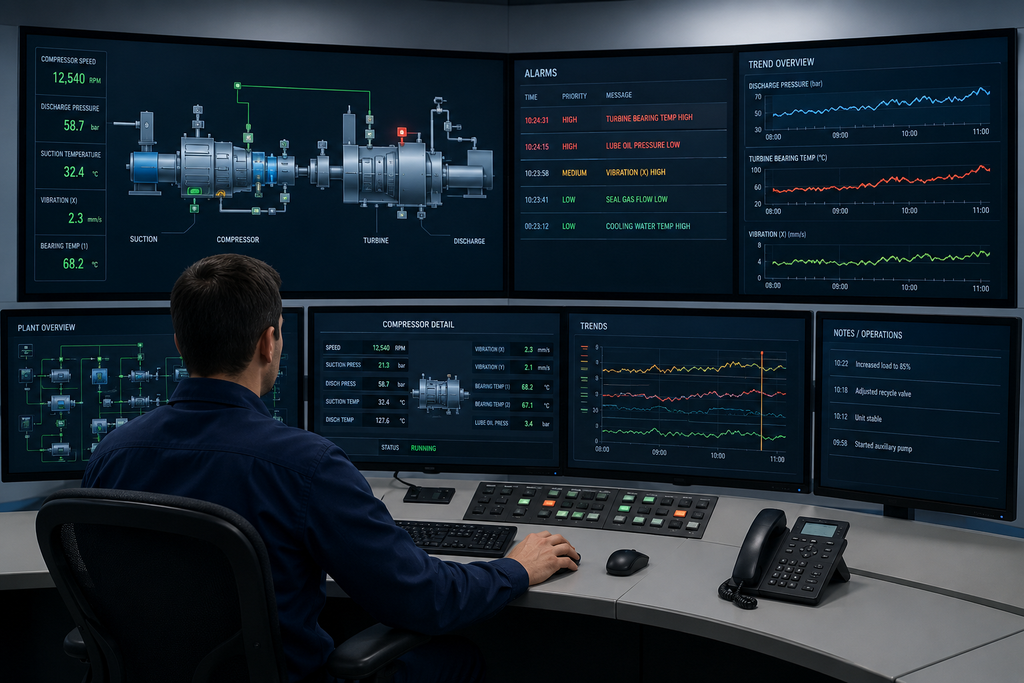
Turbomachinery control rooms sit at the exact center of your industrial operations. When massive compressors, high-speed turbines, and critical pumps are running at extreme pressures and temperatures, a single missed signal can cost your company hundreds of thousands of dollars in lost production, severe equipment damage, or worse. Your operators are your absolute last line of defense when things go wrong. Yet, many industrial facilities still rely on cluttered, decades-old control screens. Let us walk through how modern human machine interface (HMI) design transforms your control room into a powerhouse of clarity, safety, and operational excellence.
The High-Stakes Reality of Turbomachinery Control
Unlike standard manufacturing environments where deviations unfold over many minutes or even hours, turbomachinery issues develop in seconds. Conditions inside a high-speed compressor or heavy-duty turbine shift rapidly. When an anomaly occurs, your operators must notice the problem, understand its root cause, and respond correctly under intense time pressure.
A well-designed human-machine interface gives your team clear signals rather than visual noise. A poorly designed interface buries critical warnings among routine operational chatter. The difference often dictates whether a small deviation stays small or rapidly escalates into a catastrophic plant shutdown. Furthermore, many modern industrial facilities operate with leaner crews than in past decades. With fewer personnel on site, a control room built around intuitive human-centric design principles is no longer a luxury. It is an absolute necessity that helps a streamlined team maintain total control.
Mastering the Operator Interface: Core Pillars of Modern HMI Design
Moving away from legacy, cluttered layouts requires a deliberate focus on how human operators actually process information under stress. Here are the four foundational pillars that drive a high-performance control room:
Alarm Visibility: Stop Drowning in Digital Noise
An alarm should be a direct distress signal telling the operator that something demands immediate attention. But when too many alarms trigger at once, operators experience severe sensory overload. They cannot easily figure out which signal actually matters.
Industry standards like EEMUA 191 recommend keeping operator alarm rates manageable. They also recommend capping high-priority alerts and eliminating standing alarms that linger for hours on end without resolution. To achieve this level of clarity, your control room needs a thorough alarm rationalization strategy:
- Color with Purpose: Reserve bright color coding strictly for genuine abnormal conditions instead of cluttering the screen with routine status updates.
- Laser-Sharp Prioritization: Implement clear priority tiers so your operating team knows precisely which alarm demands immediate action first.
- The Purge: Ruthlessly strip out duplicate, nuisance, and ghost alarms that add mental noise without providing any operational value.
- Acoustic Intelligence: Match your audible tones directly to the true seriousness of the situation so audio cues guide attention accurately.
When you rationalize your alarms, your operators shift instantly from guessing in the dark to reacting with absolute confidence.
Color and Visual Hierarchy: Make the Signal Stand Out
Color is one of the most powerful tools in your visual toolkit. Yet, it is routinely abused in older control systems. Traditional setups throw bright reds, yellows, and greens everywhere across the board. This constant visual noise trains operators to tune out color entirely.
- The Calm Default: Normal, healthy operations should look quiet, clean, and visually understated on screen.
- Instant Contrast: The exact second a real problem occurs, it should pop off the screen immediately to draw the eye without delay.
- Fatigue Reduction: High-performance graphics reduce eye strain and mental exhaustion during grueling 12-hour shifts.
By establishing a strict visual hierarchy where the most critical information grabs attention first, you cut your operator response times from minutes down to crucial seconds.
Trend Data: Giving Numbers a Story in Your HMI Design
A single static reading only tells you what is happening right this exact second. It provides zero context about where the machine is heading or how fast it is getting there. For high-speed turbomachinery, microscopic shifts in vibration, temperature, or pressure often signal a developing mechanical failure long before a formal alarm trips.
- Spotting the Trend: A slow, creeping rise in bearing temperature over several hours usually points to a developing lubrication failure or mechanical binding.
- Immediate Context: Placing live trend charts right next to current live values gives your team the full story at a single glance.
- Proactive Action: Operators can easily decide whether to monitor, adjust, or safely shut down long before a minor issue spirals into a costly emergency.
Trend data transforms isolated numbers into an understandable narrative, allowing your team to anticipate problems rather than merely reacting to disasters.
Intuitive Screen Navigation: Three Questions Every HMI Design Must Answer
When an emergency hits, your operators do not have time to hunt through a confusing maze of nested submenus. Following established guidelines such as the ANSI ISA 101 standard, a world-class control room organizes displays logically, moving smoothly from a broad plant overview to specific equipment details.
Every single screen you put in front of your operators should answer three vital questions within three seconds:
- What is the current state of this specific equipment?
- Is everything operating normally right now?
- Does anything require immediate human intervention?
When your screens are built around these straightforward questions, your team spends less time searching the interface and more time protecting your valuable capital assets.
How to Elevate Your Control Room Strategy
Transforming your control room is not a mere cosmetic makeover. It is a direct, high-return investment in plant safety, equipment longevity, and your company bottom-line profitability. Upgrading your systems involves a proven, step-by-step pathway:
1. Audit Your Existing Interface:
Evaluate your current control screens against modern high-performance graphic standards to identify hidden visual noise, poor contrast, and chronic alarm floods.
2. Rationalize Your Alarms:
Clean up your alarm database using industry benchmarks like EEMUA 191 to eliminate nuisance alerts, reduce fatigue, and prioritize what truly matters.
3. Engage Your Operators:
Involve your front-line operators early in the design and testing phases so the final interface matches how they actually think and work under pressure.
4. Deploy and Train:
Roll out intuitive, consistent screen layouts alongside targeted training documentation to reduce error rates and accelerate onboarding for new staff.
Partner with Petrotech to Future-Proof Your Facility
Turbomachinery plants operate at the razor’s edge of physical limits, where seconds dictate the difference between profitability and financial disaster. A brilliant human-machine interface does not just manage risk. It empowers your entire team to operate with total mastery and peace of mind.
Petrotech combines decades of deep process knowledge with proven design standards to build control room interfaces tailored specifically to your exact operational needs. We help you bridge the gap between aging legacy hardware and modern high-performance control standards. Contact us today to discuss how better HMI design can support your team.